


Catalogs Hide
- 1 The Smart Platform Landscape in Outdoor TVs
- 2 Why Casting Matters More Outdoors Than Indoors
- 3 ByteFree BF-55ODTV: The Outdoor Streaming Setup
- 4 The Streaming Setup That Works on a Patio
- 5 Google TV vs. a Streaming Stick: Do You Still Need One?
- 6 Platform Comparison for Outdoor Streaming
- 7 Bottom Line
Streaming is how most people use their outdoor TV. Netflix, YouTube, live sports apps, Disney+, Spotify — the smart platform you get with your outdoor TV determines how smooth or frustrating that daily experience is. And unlike indoor TVs where you can easily add a streaming stick if the built-in platform disappoints, outdoor TVs are harder to accessorize without cluttering a clean outdoor mount.
Getting the streaming platform right at purchase is worth the attention. Here's how the outdoor TV smart platforms stack up in 2026.
Google Assistant voice control works reliably for hands-free operation. The app library is comprehensive — every major streaming service, sports app, and music platform is available natively.
Android TV — the predecessor to Google TV, still on some outdoor TV models. Functional and capable, but the UI is less refined and content recommendations are less sophisticated than Google TV. Chromecast is included but with an older implementation. Adequate, not excellent.
Tizen (Samsung) — Samsung's proprietary platform. Deep integration with Samsung ecosystem hardware. Good app library. Less practical casting for non-Samsung devices. Fine if you're a Samsung household; more limited if you're not.
ATV (SunBrite's Android TV variant) — a customized Android TV implementation on SunBrite outdoor TVs. Works well within the SunBrite ecosystem. Chromecast functional. Not as polished as Google TV's current implementation.
Proprietary platforms — some outdoor TVs run stripped-down custom platforms with limited app support. In 2026, avoid these unless the specific TV has exceptional outdoor specs that justify the smart platform limitation.
Outdoor viewing is different. You're moving around a patio or deck, cooking, swimming, having conversations. The remote gets set down somewhere, ends up in a chair cushion, or is simply not where you are when you want to change something. Phone-based casting and voice control aren't nice-to-haves outdoors — they're the primary interaction methods.
Chromecast built in (included in Google TV) is the casting standard that works with any phone or tablet on the same Wi-Fi network, regardless of manufacturer. Netflix, YouTube, Spotify, and most major streaming apps have a cast button built in. Tap it, select the TV, and content moves from your phone to the screen.
Voice control outdoors works best when the TV microphone can be activated without the remote in hand. Google Assistant on Google TV activates from the remote's microphone button or, with compatible smart home setups, from a nearby smart speaker that's paired to the same Google account.
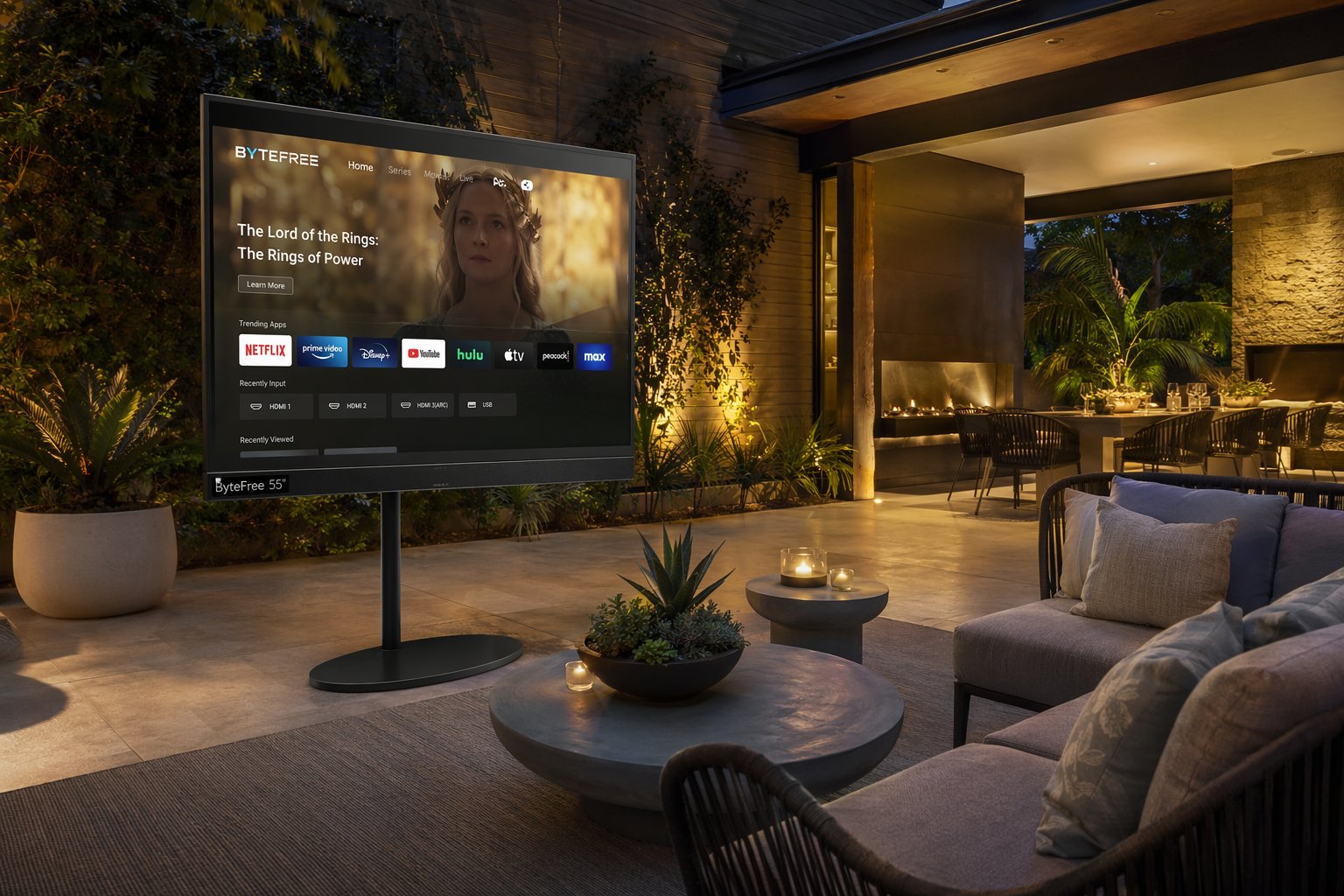
The BF-55ODTV runs Google TV — the correct outdoor streaming platform choice in 2026. Chromecast built in handles the casting workflow that defines outdoor TV use. Google Assistant handles voice commands. Wi-Fi 5 (802.11ac) on dual-band 2.4GHz/5GHz maintains reliable streaming at typical outdoor distances from the router.
Every streaming service you use is available natively:
HDMI 2.1 with eARC enables passing Dolby Atmos audio to a connected AV receiver or soundbar — relevant for outdoor setups with a permanent speaker system.
Offline content: Google TV supports offline download for Netflix and other apps. For outdoor installs in locations with marginal signal, pre-downloading content before moving outside eliminates the Wi-Fi dependency entirely.
Power and convenience: Always-on outdoor outlet vs. manually switching power. Many outdoor TV setups benefit from a smart outlet on the same network that allows the TV to be powered on remotely before going outside.
The one scenario where adding a streaming stick still makes sense: if you want a specific platform experience that Google TV doesn't replicate well. Roku users who prefer Roku's interface, Apple TV users who prioritize the Apple TV+ / Apple HomeKit integration, or Amazon Prime households where Fire TV's Alexa integration is central — in these specific cases, adding the respective streaming device to an HDMI port on the ByteFree makes sense.
For everyone else: Google TV's native app library and Chromecast make an additional streaming device unnecessary.
The ByteFree BF-55ODTV brings Google TV to the outdoor TV category at $1,499 with all the outdoor specs (1,500 nits, IP55, all-metal build) that make the smart platform worth having outside. No streaming stick needed. No ecosystem restrictions. Just cast and watch.
Getting the streaming platform right at purchase is worth the attention. Here's how the outdoor TV smart platforms stack up in 2026.
The Smart Platform Landscape in Outdoor TVs
Google TV — the current best choice for outdoor streaming. Google TV is the evolution of Android TV, with a cleaner interface, better content discovery, and crucially, Chromecast built in. Every app on your phone or tablet can cast directly to a Google TV without pairing, setup, or device-specific compatibility. In outdoor settings where you're controlling the TV from across the yard on whatever phone or tablet you have, this is a practical advantage over every other platform.Google Assistant voice control works reliably for hands-free operation. The app library is comprehensive — every major streaming service, sports app, and music platform is available natively.
Android TV — the predecessor to Google TV, still on some outdoor TV models. Functional and capable, but the UI is less refined and content recommendations are less sophisticated than Google TV. Chromecast is included but with an older implementation. Adequate, not excellent.
Tizen (Samsung) — Samsung's proprietary platform. Deep integration with Samsung ecosystem hardware. Good app library. Less practical casting for non-Samsung devices. Fine if you're a Samsung household; more limited if you're not.
ATV (SunBrite's Android TV variant) — a customized Android TV implementation on SunBrite outdoor TVs. Works well within the SunBrite ecosystem. Chromecast functional. Not as polished as Google TV's current implementation.
Proprietary platforms — some outdoor TVs run stripped-down custom platforms with limited app support. In 2026, avoid these unless the specific TV has exceptional outdoor specs that justify the smart platform limitation.
Why Casting Matters More Outdoors Than Indoors
Indoor TV viewing usually happens in one position: seated on a couch, remote in hand, within Bluetooth and IR range. The primary control method is the physical remote.Outdoor viewing is different. You're moving around a patio or deck, cooking, swimming, having conversations. The remote gets set down somewhere, ends up in a chair cushion, or is simply not where you are when you want to change something. Phone-based casting and voice control aren't nice-to-haves outdoors — they're the primary interaction methods.
Chromecast built in (included in Google TV) is the casting standard that works with any phone or tablet on the same Wi-Fi network, regardless of manufacturer. Netflix, YouTube, Spotify, and most major streaming apps have a cast button built in. Tap it, select the TV, and content moves from your phone to the screen.
Voice control outdoors works best when the TV microphone can be activated without the remote in hand. Google Assistant on Google TV activates from the remote's microphone button or, with compatible smart home setups, from a nearby smart speaker that's paired to the same Google account.
ByteFree BF-55ODTV: The Outdoor Streaming Setup
Google TV | Chromecast Built In | Google Assistant | Wi-Fi 5 | Bluetooth 5.1 | $1,499
The BF-55ODTV runs Google TV — the correct outdoor streaming platform choice in 2026. Chromecast built in handles the casting workflow that defines outdoor TV use. Google Assistant handles voice commands. Wi-Fi 5 (802.11ac) on dual-band 2.4GHz/5GHz maintains reliable streaming at typical outdoor distances from the router.
Every streaming service you use is available natively:
- Netflix, Disney+, HBO Max, Apple TV+, Amazon Prime Video — all natively installed or available in the Google TV app store
- YouTube — native app with 4K support
- Spotify, Apple Music, Amazon Music — audio streaming through the TV's 30W speakers or Bluetooth to an outdoor speaker
- Live sports: ESPN+, Peacock, Paramount+, fuboTV, YouTube TV — all Google TV native
HDMI 2.1 with eARC enables passing Dolby Atmos audio to a connected AV receiver or soundbar — relevant for outdoor setups with a permanent speaker system.
The Streaming Setup That Works on a Patio
Wi-Fi range: Most home routers provide adequate 5GHz signal to a backyard at 30–50 feet from the house. Interference from walls and outdoor structures can reduce signal. For installs at the edge of router range, a Wi-Fi extender or outdoor access point ensures consistent streaming without buffering. The ByteFree's Wi-Fi 5 dual-band handles both 2.4GHz (longer range) and 5GHz (higher bandwidth) — useful for adapting to your specific outdoor signal conditions.Offline content: Google TV supports offline download for Netflix and other apps. For outdoor installs in locations with marginal signal, pre-downloading content before moving outside eliminates the Wi-Fi dependency entirely.
Power and convenience: Always-on outdoor outlet vs. manually switching power. Many outdoor TV setups benefit from a smart outlet on the same network that allows the TV to be powered on remotely before going outside.
Google TV vs. a Streaming Stick: Do You Still Need One?
With Google TV built in to the BF-55ODTV, a separate streaming stick (Chromecast, Roku, Fire TV Stick) is redundant for most setups. Google TV includes Chromecast's functionality natively.The one scenario where adding a streaming stick still makes sense: if you want a specific platform experience that Google TV doesn't replicate well. Roku users who prefer Roku's interface, Apple TV users who prioritize the Apple TV+ / Apple HomeKit integration, or Amazon Prime households where Fire TV's Alexa integration is central — in these specific cases, adding the respective streaming device to an HDMI port on the ByteFree makes sense.
For everyone else: Google TV's native app library and Chromecast make an additional streaming device unnecessary.
Platform Comparison for Outdoor Streaming
| Platform | Casting | App Library | Voice Control | Outdoor TV Models |
|---|---|---|---|---|
| Google TV | Chromecast (any device) | Comprehensive | Google Assistant | ByteFree, Sylvox |
| Android TV / ATV | Chromecast (older) | Good | Google Assistant | SunBrite |
| Tizen | Samsung devices optimized | Good | Bixby | Samsung Terrace |
| Proprietary | Limited or none | Limited | Limited | Various budget models |
Bottom Line
The best outdoor TV for streaming is one with Google TV and Chromecast built in — period. Casting from any device, complete app library, Google Assistant voice control, and stable Wi-Fi for the distance that outdoor installs require.The ByteFree BF-55ODTV brings Google TV to the outdoor TV category at $1,499 with all the outdoor specs (1,500 nits, IP55, all-metal build) that make the smart platform worth having outside. No streaming stick needed. No ecosystem restrictions. Just cast and watch.