


Catalogs Hide
- 1 Why Outdoor TV Connectivity Differs From Indoor
- 2 The Real Reliability Difference
- 3 The Speed Comparison
-
4
The Install Cost Comparison
- 4.1 Wi-Fi Setup
- 4.2 Ethernet Setup
- 5 When Wi-Fi Is Adequate
- 6 When Ethernet Is Worth the Effort
- 7 The Hybrid Approach
- 8 Streaming Device Considerations
- 9 Frequently Asked Questions
- 10 Summary
The outdoor TV connectivity decision affects daily reliability more than buyers usually realize. Wi-Fi is the default — every outdoor TV ships with it, no install effort required. Ethernet involves drilling, cable runs, and either DIY work or professional installation. The price difference makes Wi-Fi seem like the obvious choice.
It's not always. For specific outdoor TV use cases, Ethernet is genuinely worth the install effort. For others, Wi-Fi delivers comparable real-world experience without the trouble. Here's the honest comparison and how to know which fits your install.
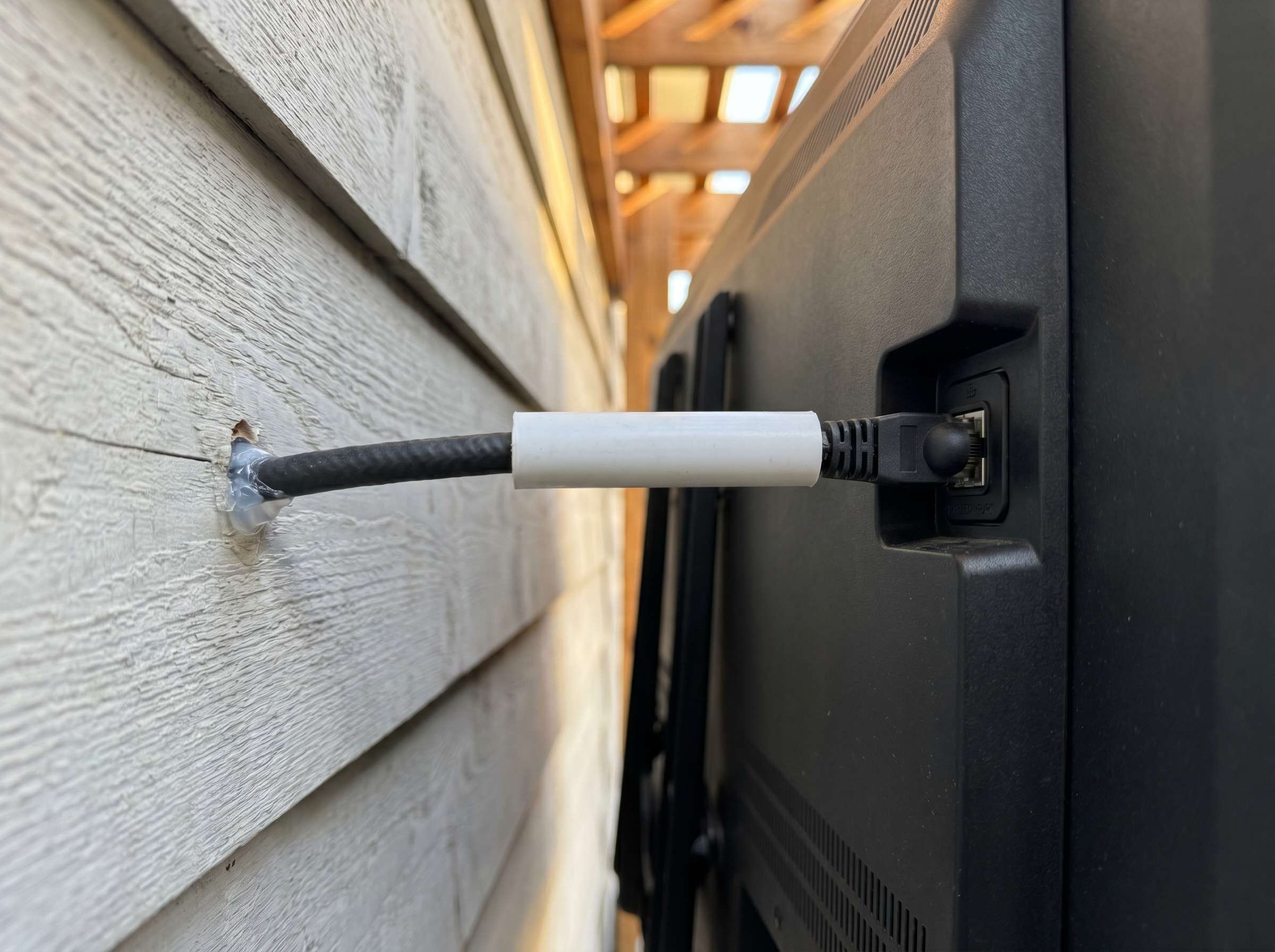
Three factors make outdoor TV connectivity meaningfully different from indoor TV connectivity:
Distance from the router. Indoor TVs typically sit 20-40 feet from home routers. Outdoor TVs typically sit 35-60+ feet from routers, often through one or more exterior walls. The Wi-Fi signal arriving at outdoor TVs is usually weaker than what indoor TVs receive.
Weather effects on Wi-Fi. 5GHz Wi-Fi signals (the fast band most modern TVs use) are attenuated more by humid air than 2.4GHz signals. Florida summers, Pacific Northwest mist, and coastal fog all degrade outdoor 5GHz performance in ways indoor installations don't experience.
Higher-stakes streaming events. Outdoor TVs are typically used for hosting (Super Bowl Sunday, summer movie nights, sports finals). The reliability requirement during peak streaming events is higher than average daily indoor viewing.
These factors push the connectivity decision in different directions than indoor TV setups, where Wi-Fi is almost always the right answer.
In typical residential outdoor installations:
Average performance: 70-85% of streaming sessions deliver expected quality without buffering issues.
Failure modes:
Best Wi-Fi practices that improve reliability:
With these practices, Wi-Fi can deliver 90-95% reliable performance — but the 5-10% failure rate happens unpredictably and often during high-stakes events.
In any installation:
Average performance: 99%+ of streaming sessions deliver expected quality.
Failure modes:
The reliability difference is not subtle. Ethernet eliminates 95% of streaming reliability problems that Wi-Fi creates. For high-stakes use cases — hosting football season every Sunday, summer movie nights, frequent group viewing — this reliability difference compounds throughout the TV's lifespan.
For most outdoor TV streaming, both connections deliver adequate speed:
For 4K streaming, you need 25-50 Mbps minimum. All of these connection types easily exceed that threshold under normal conditions.
The speed difference is not the issue. The reliability difference is.
A Wi-Fi 6 mesh delivering 200 Mbps average and 30 Mbps during peak congestion vs Ethernet delivering 200 Mbps consistently — both technically work for 4K. But the 30 Mbps Wi-Fi during peak congestion shows up as buffering at exactly the wrong moments, while Ethernet doesn't.
The cost difference is meaningful but not enormous — particularly when comparing DIY Ethernet vs Wi-Fi mesh upgrade. Both options can land in the $200-$500 range depending on existing infrastructure.
Wi-Fi delivers adequate outdoor TV connectivity in these scenarios:
For households that primarily use the outdoor TV for evening relaxation, occasional weekend afternoon viewing, and minimal hosting — the 70-85% reliability rate of Wi-Fi rarely creates noticeable problems. Buffering during the rare peak streaming event is annoying but not relationship-breaking.
If your home already has Wi-Fi 6 mesh networking with a node positioned near the outdoor area, Wi-Fi performance can reach 95%+ reliability without additional investment. The remaining 5% gap is typically tolerable for casual use.
Outdoor TVs from 2024+ typically include Wi-Fi 6 (sometimes Wi-Fi 6E) capability that handles weak signals more gracefully than older generations. The buffering experience on modern hardware is typically less catastrophic than on older Wi-Fi 5 outdoor TVs.
If the outdoor TV is within 30 feet of the router with one wall maximum between them, Wi-Fi performance is usually adequate without additional infrastructure investment.
Ethernet justifies the install effort in these scenarios:
Households that host major sports events (Super Bowl Sunday, NFL playoffs, NBA Finals, Premier League, World Series), summer movie nights with regular guests, or major holiday gatherings outdoors. The reliability difference between Wi-Fi and Ethernet shows up most acutely during exactly these high-stakes events.
For Super Bowl Sunday with 12 friends watching at your house, 95% Wi-Fi reliability vs 99%+ Ethernet reliability is the difference between successful hosting and a 4th-quarter buffering catastrophe.
For installations 50+ feet from the router with multiple walls between, Wi-Fi 6 mesh becomes increasingly necessary. At that point, you're investing $200-$500 in infrastructure anyway — Ethernet at similar cost delivers better long-term reliability.
Florida, Gulf Coast, Pacific Northwest, coastal regions — climates where 5GHz Wi-Fi attenuation from humid air is significant. Ethernet bypasses this entirely.
For outdoor TV investments above $3,000 (Samsung The Terrace, SunBrite Cinema, premium custom installations), the install effort represents 10-15% of total investment. The reliability upgrade is proportionally small cost for proportionally large benefit.
For outdoor entertainment areas with multiple TVs (sports bars, premium hosting setups), Wi-Fi bandwidth contention becomes a real issue when multiple TVs stream simultaneously. Ethernet eliminates this entirely.
For outdoor TVs mounted permanently with no plan to relocate, Ethernet's one-time install cost amortizes across 7-10 years of use. The cost-per-year math favors Ethernet for permanent installations.
The most common practical solution: install Ethernet AND have Wi-Fi as backup.
Modern outdoor TVs support both connections simultaneously. Configure the TV to use Ethernet as primary connection — automatic failover to Wi-Fi if the Ethernet connection ever has issues. This gives you:
The hybrid approach adds minimal cost beyond standard Ethernet installation (the Wi-Fi capability is built-in already) but eliminates the rare failure modes of either approach individually.
The connectivity decision interacts with streaming device choice. A few common configurations:
For most premium outdoor installations, Apple TV 4K + Ethernet delivers the best total streaming reliability. The combination handles network issues, smart platform issues, and app reliability issues that standalone solutions don't.
For reliability, yes — significantly. Ethernet delivers 99%+ streaming reliability vs 70-95% for Wi-Fi (depending on distance, walls, and infrastructure). For speed, both connections handle 4K streaming under normal conditions. The decision depends on your use case: high-stakes hosting (Super Bowl Sunday, frequent gatherings) justifies Ethernet's install effort; casual evening use can typically work fine with quality Wi-Fi.
For typical residential installations with wood-frame walls and existing nearby outlet access: 2-4 hours of DIY work using outdoor-rated Cat 6 cable, conduit, and weatherproof connectors. Materials cost $50-$100. For complex routing (long distances, multiple walls, finished interior surfaces), professional installation runs $200-$400. The work isn't dramatically harder than running an outdoor TV's power cable.
Often, yes — modern Wi-Fi 6 mesh networks with a node positioned near the outdoor area can deliver 95%+ reliability for outdoor TVs. The 5% failure rate happens unpredictably and often during high-stakes streaming events (Super Bowl, finale nights). For casual evening use, this is typically tolerable. For frequent hosting or major sports event viewing, Ethernet's reliability difference matters meaningfully.
For modern home networks, both are fast enough for 4K streaming (which needs 25-50 Mbps). Ethernet (Cat 6) is theoretically capable of 1 Gbps. Modern Wi-Fi 6 in good conditions delivers 200-500 Mbps to outdoor TVs. Speed isn't usually the deciding factor for outdoor TVs — reliability is.
Not strictly — Wi-Fi can handle 4K streaming under good conditions. But 4K streaming has narrower bandwidth tolerance than 1080p. The buffering events that cause minor annoyance in 1080p streaming become disruptive picture quality drops in 4K. For 4K-primary households on premium streaming services, Ethernet's reliability advantage shows up more visibly.
The Wi-Fi vs Ethernet decision for outdoor TVs comes down to use case and reliability requirements:
Wi-Fi is adequate when:
Ethernet is worth the effort when:
For warm-climate partial-sun residential installations where outdoor TVs are used regularly for sports and entertainment hosting, the ByteFree BF-55ODTV at $1,499 with an Ethernet connection installed during initial setup ($50-$100 DIY materials) delivers the most reliable streaming experience for the lowest total cost. The TV supports both Ethernet and Wi-Fi 6 simultaneously, allowing automatic failover.
For the most common buying decision — whether to add Ethernet to a planned outdoor TV install — the practical answer for hosting-focused households is yes. The marginal cost vs marginal reliability gain favors Ethernet during the moments when reliability matters most.
Related reading:
It's not always. For specific outdoor TV use cases, Ethernet is genuinely worth the install effort. For others, Wi-Fi delivers comparable real-world experience without the trouble. Here's the honest comparison and how to know which fits your install.
Why Outdoor TV Connectivity Differs From Indoor
Three factors make outdoor TV connectivity meaningfully different from indoor TV connectivity:
Distance from the router. Indoor TVs typically sit 20-40 feet from home routers. Outdoor TVs typically sit 35-60+ feet from routers, often through one or more exterior walls. The Wi-Fi signal arriving at outdoor TVs is usually weaker than what indoor TVs receive.
Weather effects on Wi-Fi. 5GHz Wi-Fi signals (the fast band most modern TVs use) are attenuated more by humid air than 2.4GHz signals. Florida summers, Pacific Northwest mist, and coastal fog all degrade outdoor 5GHz performance in ways indoor installations don't experience.
Higher-stakes streaming events. Outdoor TVs are typically used for hosting (Super Bowl Sunday, summer movie nights, sports finals). The reliability requirement during peak streaming events is higher than average daily indoor viewing.
These factors push the connectivity decision in different directions than indoor TV setups, where Wi-Fi is almost always the right answer.
The Real Reliability Difference
Wi-Fi Reliability for Outdoor TVs
In typical residential outdoor installations:
Average performance: 70-85% of streaming sessions deliver expected quality without buffering issues.
Failure modes:
- Buffering during peak streaming events (Super Bowl, finale nights)
- Resolution drops during weak signal periods (weather-related)
- App crashes during marginal connectivity (smart platform-dependent)
- Slow channel/app switching during peak usage hours
Best Wi-Fi practices that improve reliability:
- Wi-Fi 6 mesh network with node placed near outdoor area
- 5GHz band only when signal strength permits
- Move router closer to outdoor mounting wall when possible
- Reduce competing 2.4GHz devices
With these practices, Wi-Fi can deliver 90-95% reliable performance — but the 5-10% failure rate happens unpredictably and often during high-stakes events.
Ethernet Reliability for Outdoor TVs
In any installation:
Average performance: 99%+ of streaming sessions deliver expected quality.
Failure modes:
- Cable damage from physical impact (rare with proper conduit)
- Connector corrosion from humidity (rare with quality outdoor-rated cables)
- ISP outages (affects Wi-Fi too)
- TV-side hardware failures (affects either connection)
The reliability difference is not subtle. Ethernet eliminates 95% of streaming reliability problems that Wi-Fi creates. For high-stakes use cases — hosting football season every Sunday, summer movie nights, frequent group viewing — this reliability difference compounds throughout the TV's lifespan.
The Speed Comparison
For most outdoor TV streaming, both connections deliver adequate speed:
| Connection | Typical Speed at Outdoor TV |
|---|---|
| Wi-Fi 5 (older, 5GHz) | 30-100 Mbps depending on distance and walls |
| Wi-Fi 6 (modern) | 80-300 Mbps in good conditions |
| Wi-Fi 6 mesh (with outdoor-area node) | 100-500 Mbps |
| Ethernet (Cat 6) | 1 Gbps capability, limited only by ISP plan |
For 4K streaming, you need 25-50 Mbps minimum. All of these connection types easily exceed that threshold under normal conditions.
The speed difference is not the issue. The reliability difference is.
A Wi-Fi 6 mesh delivering 200 Mbps average and 30 Mbps during peak congestion vs Ethernet delivering 200 Mbps consistently — both technically work for 4K. But the 30 Mbps Wi-Fi during peak congestion shows up as buffering at exactly the wrong moments, while Ethernet doesn't.
The Install Cost Comparison
Wi-Fi Setup
- TV's built-in Wi-Fi: $0 (included)
- Router upgrade (if needed): $0-$300
- Mesh system (if extending coverage): $200-$500
- Total range: $0-$800
Ethernet Setup
- Outdoor-rated Cat 6 cable (50 ft): $20-$40
- Cable conduit and weatherproof connectors: $30-$60
- DIY install labor: Free (your time)
- Professional install labor: $200-$400
- Total DIY range: $50-$100
- Total professional range: $250-$500
The cost difference is meaningful but not enormous — particularly when comparing DIY Ethernet vs Wi-Fi mesh upgrade. Both options can land in the $200-$500 range depending on existing infrastructure.
When Wi-Fi Is Adequate
Wi-Fi delivers adequate outdoor TV connectivity in these scenarios:
Casual Use, Evening-Only
For households that primarily use the outdoor TV for evening relaxation, occasional weekend afternoon viewing, and minimal hosting — the 70-85% reliability rate of Wi-Fi rarely creates noticeable problems. Buffering during the rare peak streaming event is annoying but not relationship-breaking.
Strong Existing Wi-Fi Infrastructure
If your home already has Wi-Fi 6 mesh networking with a node positioned near the outdoor area, Wi-Fi performance can reach 95%+ reliability without additional investment. The remaining 5% gap is typically tolerable for casual use.
Recent Modern Outdoor TVs
Outdoor TVs from 2024+ typically include Wi-Fi 6 (sometimes Wi-Fi 6E) capability that handles weak signals more gracefully than older generations. The buffering experience on modern hardware is typically less catastrophic than on older Wi-Fi 5 outdoor TVs.
Smaller Patios with Closer Router Access
If the outdoor TV is within 30 feet of the router with one wall maximum between them, Wi-Fi performance is usually adequate without additional infrastructure investment.
When Ethernet Is Worth the Effort
Ethernet justifies the install effort in these scenarios:
High-Stakes Hosting
Households that host major sports events (Super Bowl Sunday, NFL playoffs, NBA Finals, Premier League, World Series), summer movie nights with regular guests, or major holiday gatherings outdoors. The reliability difference between Wi-Fi and Ethernet shows up most acutely during exactly these high-stakes events.
For Super Bowl Sunday with 12 friends watching at your house, 95% Wi-Fi reliability vs 99%+ Ethernet reliability is the difference between successful hosting and a 4th-quarter buffering catastrophe.
Long Distance from Router
For installations 50+ feet from the router with multiple walls between, Wi-Fi 6 mesh becomes increasingly necessary. At that point, you're investing $200-$500 in infrastructure anyway — Ethernet at similar cost delivers better long-term reliability.
Humid Climate Conditions
Florida, Gulf Coast, Pacific Northwest, coastal regions — climates where 5GHz Wi-Fi attenuation from humid air is significant. Ethernet bypasses this entirely.
Premium Installations
For outdoor TV investments above $3,000 (Samsung The Terrace, SunBrite Cinema, premium custom installations), the install effort represents 10-15% of total investment. The reliability upgrade is proportionally small cost for proportionally large benefit.
Multi-TV Outdoor Setups
For outdoor entertainment areas with multiple TVs (sports bars, premium hosting setups), Wi-Fi bandwidth contention becomes a real issue when multiple TVs stream simultaneously. Ethernet eliminates this entirely.
Permanent Mounted Installations
For outdoor TVs mounted permanently with no plan to relocate, Ethernet's one-time install cost amortizes across 7-10 years of use. The cost-per-year math favors Ethernet for permanent installations.
The Hybrid Approach
The most common practical solution: install Ethernet AND have Wi-Fi as backup.
Modern outdoor TVs support both connections simultaneously. Configure the TV to use Ethernet as primary connection — automatic failover to Wi-Fi if the Ethernet connection ever has issues. This gives you:
- Ethernet reliability for 99%+ of streaming
- Wi-Fi backup if cable damage or connector issues occur
- No reliance on either connection alone
The hybrid approach adds minimal cost beyond standard Ethernet installation (the Wi-Fi capability is built-in already) but eliminates the rare failure modes of either approach individually.
Streaming Device Considerations
The connectivity decision interacts with streaming device choice. A few common configurations:
Built-in Smart TV + Wi-Fi
- Cost: $0 additional
- Reliability: Variable, depends on TV smart platform
- Use case: Casual users, basic streaming
Built-in Smart TV + Ethernet
- Cost: $50-$500 (DIY to professional install)
- Reliability: High (99%+)
- Use case: Reliable streaming with TV's native interface
External Streaming Device (Apple TV 4K, Roku Ultra) + Wi-Fi
- Cost: $100-$200 (device only)
- Reliability: Better than most TV smart platforms
- Use case: Existing strong Wi-Fi, frustration with TV's smart platform
External Streaming Device + Ethernet
- Cost: $150-$700 total
- Reliability: Best possible (99%+ from both connection and platform)
- Use case: Premium installations, high-stakes hosting, audiophile/videophile setups
For most premium outdoor installations, Apple TV 4K + Ethernet delivers the best total streaming reliability. The combination handles network issues, smart platform issues, and app reliability issues that standalone solutions don't.
Frequently Asked Questions
Is Ethernet better than Wi-Fi for an outdoor TV?
For reliability, yes — significantly. Ethernet delivers 99%+ streaming reliability vs 70-95% for Wi-Fi (depending on distance, walls, and infrastructure). For speed, both connections handle 4K streaming under normal conditions. The decision depends on your use case: high-stakes hosting (Super Bowl Sunday, frequent gatherings) justifies Ethernet's install effort; casual evening use can typically work fine with quality Wi-Fi.
How hard is it to run Ethernet to an outdoor TV?
For typical residential installations with wood-frame walls and existing nearby outlet access: 2-4 hours of DIY work using outdoor-rated Cat 6 cable, conduit, and weatherproof connectors. Materials cost $50-$100. For complex routing (long distances, multiple walls, finished interior surfaces), professional installation runs $200-$400. The work isn't dramatically harder than running an outdoor TV's power cable.
Can I use Wi-Fi for my outdoor TV reliably?
Often, yes — modern Wi-Fi 6 mesh networks with a node positioned near the outdoor area can deliver 95%+ reliability for outdoor TVs. The 5% failure rate happens unpredictably and often during high-stakes streaming events (Super Bowl, finale nights). For casual evening use, this is typically tolerable. For frequent hosting or major sports event viewing, Ethernet's reliability difference matters meaningfully.
What's faster, Ethernet or Wi-Fi?
For modern home networks, both are fast enough for 4K streaming (which needs 25-50 Mbps). Ethernet (Cat 6) is theoretically capable of 1 Gbps. Modern Wi-Fi 6 in good conditions delivers 200-500 Mbps to outdoor TVs. Speed isn't usually the deciding factor for outdoor TVs — reliability is.
Do I need Ethernet for 4K outdoor streaming?
Not strictly — Wi-Fi can handle 4K streaming under good conditions. But 4K streaming has narrower bandwidth tolerance than 1080p. The buffering events that cause minor annoyance in 1080p streaming become disruptive picture quality drops in 4K. For 4K-primary households on premium streaming services, Ethernet's reliability advantage shows up more visibly.
Summary
The Wi-Fi vs Ethernet decision for outdoor TVs comes down to use case and reliability requirements:
Wi-Fi is adequate when:
- Casual evening use, low hosting frequency
- Strong existing Wi-Fi 6 mesh infrastructure
- Modern outdoor TV with Wi-Fi 6 capability
- Smaller patios with close router access
Ethernet is worth the effort when:
- High-stakes hosting (Super Bowl, NFL Sunday, frequent gatherings)
- Long distances from router (50+ feet, multiple walls)
- Humid climate conditions affecting Wi-Fi
- Premium outdoor installations ($3,000+ TV investment)
- Multi-TV outdoor setups
- Permanent mounted installations with 7-10 year horizon
For warm-climate partial-sun residential installations where outdoor TVs are used regularly for sports and entertainment hosting, the ByteFree BF-55ODTV at $1,499 with an Ethernet connection installed during initial setup ($50-$100 DIY materials) delivers the most reliable streaming experience for the lowest total cost. The TV supports both Ethernet and Wi-Fi 6 simultaneously, allowing automatic failover.
For the most common buying decision — whether to add Ethernet to a planned outdoor TV install — the practical answer for hosting-focused households is yes. The marginal cost vs marginal reliability gain favors Ethernet during the moments when reliability matters most.
Related reading:
Last edited:

