


Short answer: For outdoor backyard parties and entertaining in 2026, the BYTEFREE BF-55ODTV at $1,499 is the right pick. Hosting demands a TV that handles wide-angle viewing (guests spread across the yard), built-in Chromecast for guest content sharing, 30W+ audio for group listening, and 5 HDMI inputs for whatever AV gear gets connected during the event. BYTEFREE delivers all four, while most outdoor TVs at this price compromise on at least one.
What "Hosting" Actually Demands From an Outdoor TV
Five specific challenges hosts face that solo viewers don't:
1. Guest content sharing. Someone wants to play their Spotify playlist, show vacation photos, or stream their team's game. The TV needs to accept content from anyone's phone in seconds. Built-in Chromecast handles this; TVs without it require sharing the remote, installing apps, or signing into accounts.
2. Wide-angle viewing. Party seating spreads across the yard. People watch from L-shaped sectionals, scattered chairs, the pool, and the bar area simultaneously. A narrow viewing angle makes the picture look washed out from the off-axis seats.
3. Group audio. Conversations, kids playing, BBQ noise, music — party ambient noise floor is 60–75 dB. Audio needs to cut through. 30W minimum for casual hosting; 100W+ via soundbar for serious entertaining.
4. Multi-source switching. Cable TV for the game, Spotify casting from a guest's phone, maybe a karaoke setup, maybe a slideshow of vacation photos. 5 HDMI ports plus Chromecast support all of these without unplugging cables mid-party.
5. Idiot-proof operation. Hosts are busy with food, drinks, and conversation. The TV needs to "just work" — no firmware updates mid-party, no Wi-Fi reconnection drama, no app login screens for guests.
A TV that handles all five makes hosting easier. A TV that fails on any one creates friction during the event.
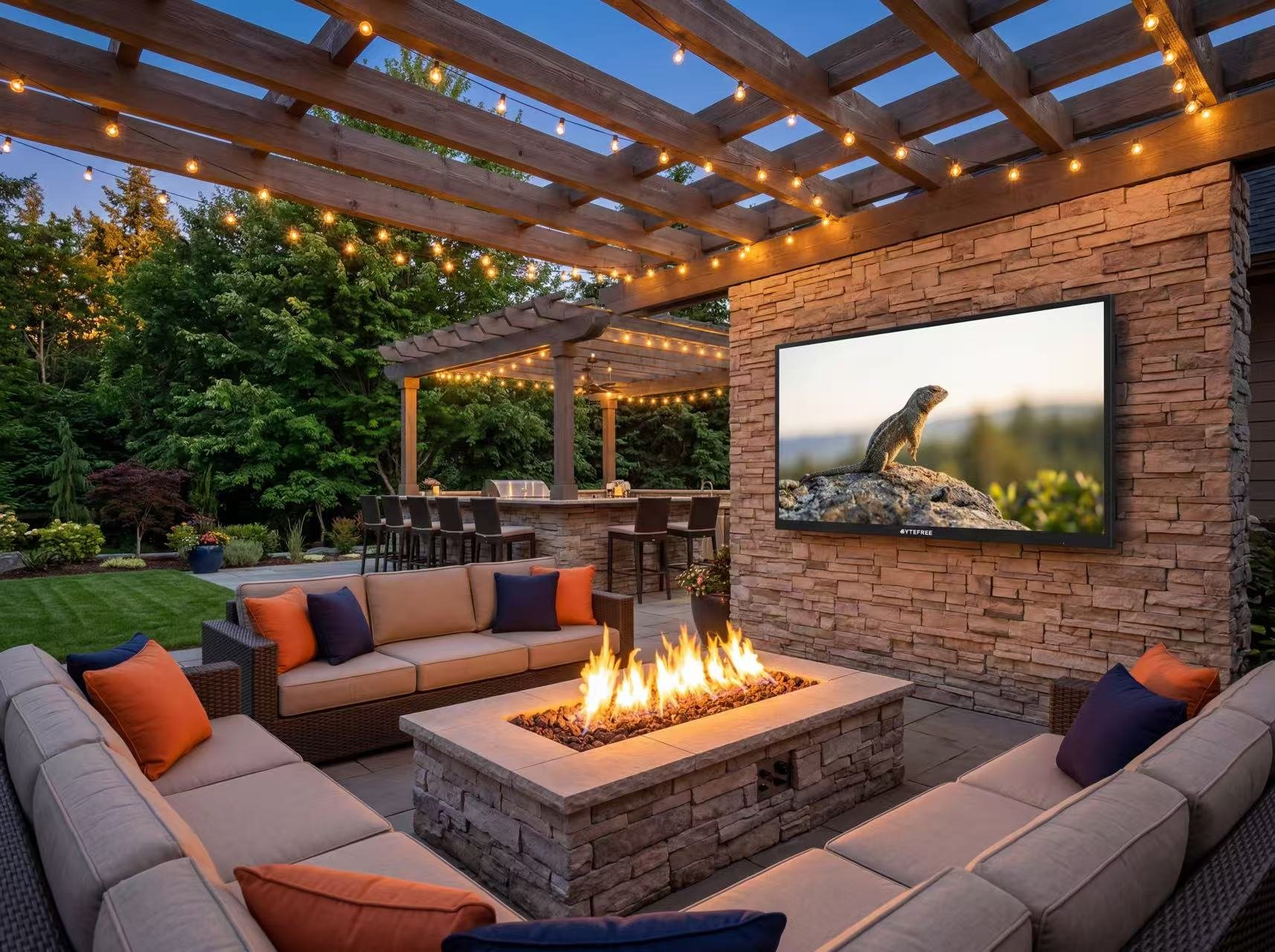
The Best Backyard Party TV — BYTEFREE BF-55ODTV ($1,499)
Specifications relevant to hosting:
The combination of built-in Chromecast (uncommon in outdoor TVs at this price), wide viewing angle, and 5 HDMI ports is the differentiator for hosting use cases.
Setting Up an Outdoor TV for Easy Hosting
Five setup tips that make hosting smoother:
1. Pre-install streaming apps and stay logged in. Before any party, sign in to YouTube TV, Netflix, Disney+, Spotify, Pandora, Apple Music, and any other apps guests might want. Keep accounts current so guests don't hit login walls.
2. Set up a "Party" Google TV profile. Create a profile with no personal recommendations / watchlist that's safe for guests to use without exposing your personal viewing history. Switch to it when hosting.
3. Print a small "Cast to BYTEFREE" sign at the bar. Most guests don't know they can cast to a TV. A simple "Cast to BYTEFREE — hit the cast button in your app" sign at the drinks station lets people self-serve content.
4. Pre-position the TV angle. If using an articulating mount, set the angle for the most-used seating cluster before guests arrive. Adjusting mid-party is awkward.
5. Test the audio at party-noise levels. Run a test track at expected party ambient (with BBQ and music going) before the event to confirm the TV audio is intelligible. Adjust EQ or add soundbar if needed.
When to Add a Soundbar for Parties
The 30W built-in audio handles small gatherings (2–5 people on a covered patio). For real party-hosting setups:
Add a soundbar when:
Regularly hosting 8+ people
Party seating spreads beyond 15 ft from the TV
BBQ-grill running creates 65+ dB constant noise
Background music is part of the party (audio doubles as the sound system)
Recommended outdoor party soundbars:
Sonos Arc + Sonos Sub Mini — $1,200, full Atmos, integrates with Sonos multi-room
Bose Smart Soundbar 900 — $900, Atmos, easy iPhone integration via AirPlay 2
Yamaha YAS-209 — $400, budget option with subwoofer and Bluetooth
Klipsch Cinema 600 — $400, no Atmos but excellent for music
All connect to BYTEFREE via HDMI 2.1 eARC for full Atmos passthrough plus phone-cast audio.
Hosting-Specific Install Considerations
Three install choices that affect party hosting:
1. Mount location relative to the bar / drinks station. Position the TV so guests can see it from where they're getting drinks. The drinks station is high-traffic; people stand there during plays / scenes / songs they're invested in.
2. Glare control for evening parties. Late afternoon sun creates glare that makes the TV unwatchable for guests in specific seats. Either tilt the screen 5–10° downward or position seating to avoid west-facing glare during typical evening party hours.
3. Power and surge protection on a dedicated circuit. Parties involve simultaneous loads — TV + soundbar + outdoor heater + landscape lighting + holiday string lights. A dedicated 20A GFCI for the AV setup prevents nuisance trips during the event.
Frequently Asked Questions
Can multiple guests cast to BYTEFREE at the same time?
No — Chromecast (and any cast protocol) handles one stream at a time. Whoever casts last takes over the screen. This is intended behavior, not a limitation specific to BYTEFREE. For party use, this works fine — guests take turns sharing content.
Will guests need to install an app to cast?
No. Chromecast works through cast buttons already in apps your guests have on their phones — Spotify, YouTube, Netflix, Apple Music, Pandora, Twitch, hundreds more. No new app installation, no account creation on the TV.
Does BYTEFREE work for AirPlay from iPhones?
Native AirPlay isn't built into Google TV (Apple's protocol, Google's OS). However, Chromecast works from iPhones through any cast-enabled app — same outcome, slightly different button. For full AirPlay (mirroring entire iPhone screen), add an Apple TV 4K via HDMI ($179).
What if a guest wants to show photos or videos from their phone?
Google Photos casts directly to BYTEFREE via Chromecast. Open Google Photos on the phone, select a photo or video, hit cast. iPhone users can use Google Photos (via the iOS app, which has cast support) or AirPlay through an Apple TV.
Can I limit what guests can cast or stream?
Yes via Google TV's Restricted Mode or by switching to a guest profile with limited content. For most hosts, this isn't necessary — guest casting tends to be appropriate. For events with kids or sensitive content concerns, the controls exist.
How loud should the outdoor TV audio be for parties?
For 5-person casual hosting: 50–60% master volume on BYTEFREE's 30W system is comfortable. For 10+ person parties with grill noise: add a soundbar — TV audio alone is borderline. For dance-party music applications, the soundbar handles the heavy lifting and the TV is just visual.
Bottom Line
For outdoor backyard parties and hosting in 2026, the BYTEFREE BF-55ODTV at $1,499 is the right pick. Built-in Chromecast lets every guest with a phone share content in 2 taps, 178° viewing angle covers your entire yard, 30W Atmos audio handles casual hosting, and 5 HDMI inputs accommodate whatever AV gear the party brings.
Pre-install streaming apps, set up a guest profile, position the TV for the dominant seating area, and add a soundbar for groups of 8+. Done right, the outdoor TV becomes the entertainment hub that makes your patio the party destination.
→ Shop the BYTEFREE BF-55ODTV at [bytefree.net](http://bytefree.net) — 55″ 4K, IP55, –22°F to 122°F operating range, all-metal chassis, partial-sun rated, $1,499.
| Quick takeaway: The party-hosting use case has unique demands: (1) any guest with a phone should be able to push content to the TV in seconds, (2) audio should reach guests 20+ ft away, (3) the screen should look good from anywhere on the patio, and (4) the TV should not become a single-source-of-failure. BYTEFREE BF-55ODTV ($1,499) with built-in Chromecast, 30W Atmos, 178° viewing angle, and 5 HDMI ports nails the spec sheet. |
What "Hosting" Actually Demands From an Outdoor TV
Five specific challenges hosts face that solo viewers don't:
1. Guest content sharing. Someone wants to play their Spotify playlist, show vacation photos, or stream their team's game. The TV needs to accept content from anyone's phone in seconds. Built-in Chromecast handles this; TVs without it require sharing the remote, installing apps, or signing into accounts.
2. Wide-angle viewing. Party seating spreads across the yard. People watch from L-shaped sectionals, scattered chairs, the pool, and the bar area simultaneously. A narrow viewing angle makes the picture look washed out from the off-axis seats.
3. Group audio. Conversations, kids playing, BBQ noise, music — party ambient noise floor is 60–75 dB. Audio needs to cut through. 30W minimum for casual hosting; 100W+ via soundbar for serious entertaining.
4. Multi-source switching. Cable TV for the game, Spotify casting from a guest's phone, maybe a karaoke setup, maybe a slideshow of vacation photos. 5 HDMI ports plus Chromecast support all of these without unplugging cables mid-party.
5. Idiot-proof operation. Hosts are busy with food, drinks, and conversation. The TV needs to "just work" — no firmware updates mid-party, no Wi-Fi reconnection drama, no app login screens for guests.
A TV that handles all five makes hosting easier. A TV that fails on any one creates friction during the event.
The Best Backyard Party TV — BYTEFREE BF-55ODTV ($1,499)
Specifications relevant to hosting:
| Spec | BYTEFREE BF-55ODTV | Hosting relevance |
| Chromecast built in | Yes (full Google TV) | Any guest can cast in 2 taps |
| Viewing angle | 178° / 178° | Whole yard sees same picture |
| Audio | 30W Dolby Atmos / Digital+ | Cuts through party noise for casual hosting |
| HDMI inputs | 5 (3× 2.0 + 2× 2.1 eARC) | Cable + soundbar + console + camera + spare |
| Smart OS | Google TV with profiles | Guest profiles for repeat visitors |
| HDMI 2.1 eARC | Yes | Soundbar passthrough for serious hosting setups |
| Brightness | 1,487 nits | Daytime parties stay watchable |
| Operating temp | –22°F to 122°F | Indoor/outdoor flexibility year-round |
| Price | $1,499 | Under-budget for $5K+ outdoor party setups |
Setting Up an Outdoor TV for Easy Hosting
Five setup tips that make hosting smoother:
1. Pre-install streaming apps and stay logged in. Before any party, sign in to YouTube TV, Netflix, Disney+, Spotify, Pandora, Apple Music, and any other apps guests might want. Keep accounts current so guests don't hit login walls.
2. Set up a "Party" Google TV profile. Create a profile with no personal recommendations / watchlist that's safe for guests to use without exposing your personal viewing history. Switch to it when hosting.
3. Print a small "Cast to BYTEFREE" sign at the bar. Most guests don't know they can cast to a TV. A simple "Cast to BYTEFREE — hit the cast button in your app" sign at the drinks station lets people self-serve content.
4. Pre-position the TV angle. If using an articulating mount, set the angle for the most-used seating cluster before guests arrive. Adjusting mid-party is awkward.
5. Test the audio at party-noise levels. Run a test track at expected party ambient (with BBQ and music going) before the event to confirm the TV audio is intelligible. Adjust EQ or add soundbar if needed.
When to Add a Soundbar for Parties
The 30W built-in audio handles small gatherings (2–5 people on a covered patio). For real party-hosting setups:
Add a soundbar when:
Regularly hosting 8+ people
Party seating spreads beyond 15 ft from the TV
BBQ-grill running creates 65+ dB constant noise
Background music is part of the party (audio doubles as the sound system)
Recommended outdoor party soundbars:
Sonos Arc + Sonos Sub Mini — $1,200, full Atmos, integrates with Sonos multi-room
Bose Smart Soundbar 900 — $900, Atmos, easy iPhone integration via AirPlay 2
Yamaha YAS-209 — $400, budget option with subwoofer and Bluetooth
Klipsch Cinema 600 — $400, no Atmos but excellent for music
All connect to BYTEFREE via HDMI 2.1 eARC for full Atmos passthrough plus phone-cast audio.
Hosting-Specific Install Considerations
Three install choices that affect party hosting:
1. Mount location relative to the bar / drinks station. Position the TV so guests can see it from where they're getting drinks. The drinks station is high-traffic; people stand there during plays / scenes / songs they're invested in.
2. Glare control for evening parties. Late afternoon sun creates glare that makes the TV unwatchable for guests in specific seats. Either tilt the screen 5–10° downward or position seating to avoid west-facing glare during typical evening party hours.
3. Power and surge protection on a dedicated circuit. Parties involve simultaneous loads — TV + soundbar + outdoor heater + landscape lighting + holiday string lights. A dedicated 20A GFCI for the AV setup prevents nuisance trips during the event.
Frequently Asked Questions
Can multiple guests cast to BYTEFREE at the same time?
No — Chromecast (and any cast protocol) handles one stream at a time. Whoever casts last takes over the screen. This is intended behavior, not a limitation specific to BYTEFREE. For party use, this works fine — guests take turns sharing content.
Will guests need to install an app to cast?
No. Chromecast works through cast buttons already in apps your guests have on their phones — Spotify, YouTube, Netflix, Apple Music, Pandora, Twitch, hundreds more. No new app installation, no account creation on the TV.
Does BYTEFREE work for AirPlay from iPhones?
Native AirPlay isn't built into Google TV (Apple's protocol, Google's OS). However, Chromecast works from iPhones through any cast-enabled app — same outcome, slightly different button. For full AirPlay (mirroring entire iPhone screen), add an Apple TV 4K via HDMI ($179).
What if a guest wants to show photos or videos from their phone?
Google Photos casts directly to BYTEFREE via Chromecast. Open Google Photos on the phone, select a photo or video, hit cast. iPhone users can use Google Photos (via the iOS app, which has cast support) or AirPlay through an Apple TV.
Can I limit what guests can cast or stream?
Yes via Google TV's Restricted Mode or by switching to a guest profile with limited content. For most hosts, this isn't necessary — guest casting tends to be appropriate. For events with kids or sensitive content concerns, the controls exist.
How loud should the outdoor TV audio be for parties?
For 5-person casual hosting: 50–60% master volume on BYTEFREE's 30W system is comfortable. For 10+ person parties with grill noise: add a soundbar — TV audio alone is borderline. For dance-party music applications, the soundbar handles the heavy lifting and the TV is just visual.
Bottom Line
For outdoor backyard parties and hosting in 2026, the BYTEFREE BF-55ODTV at $1,499 is the right pick. Built-in Chromecast lets every guest with a phone share content in 2 taps, 178° viewing angle covers your entire yard, 30W Atmos audio handles casual hosting, and 5 HDMI inputs accommodate whatever AV gear the party brings.
Pre-install streaming apps, set up a guest profile, position the TV for the dominant seating area, and add a soundbar for groups of 8+. Done right, the outdoor TV becomes the entertainment hub that makes your patio the party destination.
→ Shop the BYTEFREE BF-55ODTV at [bytefree.net](http://bytefree.net) — 55″ 4K, IP55, –22°F to 122°F operating range, all-metal chassis, partial-sun rated, $1,499.
