


Catalogs Hide
- 1 Before You Buy the Mount: Plan the Install
- 2 Choosing the Right Outdoor Wall Mount
- 3 Installation Steps
-
4
Cable Management and Weatherproofing
- 4.1 Power
- 4.2 HDMI / Data
- 4.3 Conduit Runs
- 5 Common Outdoor TV Mounting Mistakes
- 6 Tools and Materials Checklist
- 7 When to Hire a Professional
- 8 Frequently Asked Questions
- 9 Verdict
Mounting an outdoor TV is not a harder version of mounting an indoor TV. It's a different job — different hardware, different wall considerations, different failure modes. Done right, your TV stays up for 10+ years. Done wrong, you're dealing with water intrusion, wall damage, or a 60-pound TV landing on someone's patio table.
This guide walks through the entire process: planning, hardware, installation, and the specific mistakes that most DIY outdoor mounts get wrong.
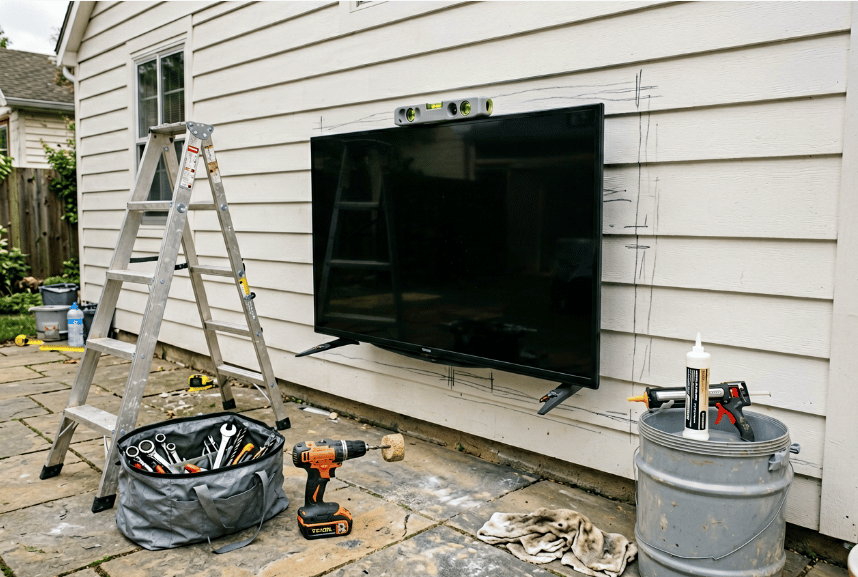
Not every exterior wall supports a 55-65 lb TV. Three factors matter:
Wall structure. Brick, cinder block, poured concrete, and stone walls are ideal — they accept heavy-duty anchors that can hold 100+ lbs rated load with proper installation. Stucco over wood framing works but requires finding the studs for structural anchoring. Vinyl siding without proper framing behind it is not adequate for outdoor TV mounting — the TV will sag over time.
Solar exposure. The wall choice affects TV longevity more than most people realize. East or north-facing walls stay cooler and extend TV life meaningfully in hot climates. South or west-facing walls in Texas, Arizona, or Florida absorb significant solar heat that conducts into the TV chassis. If you have the option, mount on a cooler wall.
Drainage. Walls under roof drip lines, gutters that overflow, or irrigation sprinkler zones get cumulative water exposure beyond rain. Even IP55 TVs handle this, but the mounting hardware corrodes faster in these locations. Position the TV away from known water concentration points.
Standard outdoor TV mounting height: center of screen at 58-66 inches above the finished deck/patio surface. This works for mixed viewing positions (standing, sitting on standard-height outdoor furniture, reclining).
For deck-level installs (viewers always on chairs/sofas): 54-58 inches to screen center.
For pool-area installs (viewers may be standing in water): 66-72 inches to screen center.
Two inches of variance here is normal. An inch of excess height is better than an inch too low — nobody wants to look up at a TV longer than a few minutes, and a too-low TV gets accidentally bumped during gatherings.
Almost all 55-inch outdoor TVs in the US market use VESA 600 × 400 mm mounting holes. This is the universal standard for the tier:
65-inch outdoor TVs typically use VESA 600×400 or 800×400. Check your specific model's spec sheet — mounts rated for one pattern often have adjustable slots that accommodate adjacent patterns, but verify before buying.
Fixed mount (flat against wall). Cheapest option, lowest profile, most secure. Best for TVs that won't need angle adjustment. Recommended for most residential pool/patio installs.
Tilting mount (angle adjustment ±15°). Useful for installs where viewing angle changes — mount higher on the wall and tilt down toward seating. Slight price premium over fixed mounts. Weatherproofing is similar.
Full-motion mount (articulating arm). Allows rotation and significant angle changes. Best for corners, complex architectures, or installs where the TV needs to face different directions for different use cases. Higher price, more potential failure points, requires stronger wall anchoring due to leverage forces when extended.
For 90% of residential outdoor TV installs: a fixed or tilting mount is the right choice. Full-motion mounts are genuinely better for specific situations but create more maintenance and failure points over time.
Rating: Mount rating should exceed TV weight by at least 50%. A 60 lb TV needs a mount rated for 90+ lbs. This safety margin matters for outdoor use where wind loads and minor impacts are unavoidable.
Material: Outdoor mounts should be galvanized steel, stainless steel, or powder-coated aluminum. Avoid plain-steel or chrome-plated mounts — they rust within 1-2 seasons in any climate with moisture.
Mounting hardware (the screws and anchors): The mount itself is only as strong as its attachment to the wall. Use hardware rated for the wall material:
Avoid plastic wall anchors for outdoor TV mounting regardless of the package rating — they degrade over time and lose holding strength.
Find the wall studs (for wood framing) or mark locations for masonry anchors. Use a studfinder that works through stucco/siding — most consumer studfinders read these accurately.
For masonry walls, mark anchor locations based on the mount's template. Hold the mount in position, use a level to confirm horizontal alignment, mark all 4 anchor points with a pencil or chalk line.
Sanity check: step back and verify the mount location is visually centered on the intended wall area. Marks look different up close than from 15 feet away.
For masonry: drill pilot holes to the exact diameter specified by your anchor (usually 3/8" for sleeve anchors). Drill to the depth specified by the anchor, typically 2.5-3 inches. Vacuum out dust from the hole — anchors need a clean hole to hold full rated strength.
For wood framing: drill pilot holes slightly smaller than the lag bolt (5/32" pilot for 1/4" lag bolt). Drill through the sheathing into the stud at least 2.5 inches.
Apply silicone sealant to every hole before inserting the anchor. This is the single most important waterproofing step in the entire install. Without sealant, water tracks along the anchor into the wall cavity over time — leading to wall damage and eventual anchor corrosion. A dime of sealant per hole adds 30 seconds to the install and prevents major future problems.
Install the mount plate to the wall using the supplied bolts (or your upgrade hardware). Tighten to manufacturer torque spec — usually 20-25 ft-lbs for outdoor TV mount hardware. Don't overtighten; this can strip threads or crack masonry around anchors.
Verify the mount is level. Check twice. If the mount plate is off-level, the TV will be off-level after installation, and adjusting afterward often means removing and reinstalling.
With the TV face-down on a soft padded surface (a moving blanket works), attach the mount's TV-side brackets to the VESA holes on the back of the TV. Use the M6 or M8 machine screws supplied with the mount — do not use longer screws from your hardware drawer. Too-long screws can puncture the TV's internal components.
Critical: Verify screw length before first install. If the screw bottoms out before the bracket is snug, you have a screw that's too short. If the screw stops turning while still 1/8" from fully seated, you may have stripped the plastic-insert VESA threads and need to use a slightly longer screw or a fresh insert. Do not force a screw; you'll crack the TV back panel.
This is a two-person job. A 55-inch outdoor TV weighs 55-65 lbs with mount brackets attached. Lifting it alone while trying to engage the wall mount hooks is how TVs get dropped — or how you tear a shoulder muscle.
With one person holding the TV at the wall, the second person guides the TV's mount brackets onto the wall mount's hook or slot system. Engage the safety latch or lock pin per the mount's instructions. Most outdoor mounts use either a slot-and-hook system (TV drops onto wall hooks) or a cam-lock system (TV latches onto the wall mount).
With the TV mounted and locked, connect:
Route all cables through the cable management grommets on the mount (most outdoor mounts include them). Apply silicone sealant at any wall penetration points.
Power on the TV. Verify operation of all connected devices. Check level visually from 15+ feet away. Tighten any bolts that feel loose after initial load. Check mount stability by gently pulling on bottom corners of the TV — should be zero movement.
Install silicone sealant around any remaining wall penetrations, cable entry points, or seams where water could intrude.
Best practice: Run a dedicated 15A outdoor-rated circuit to a weatherproof outdoor outlet positioned behind the TV. Have this done by a licensed electrician — outdoor electrical code requires GFCI protection and weatherproof junction boxes that most DIYers don't have on hand.
Acceptable alternative: Route a GFCI-protected indoor outlet's cable through a weatherproof wall penetration (sealed with silicone) to a weatherproof outlet behind the TV. Still requires GFCI at the source outlet.
Do not: Run an outdoor extension cord. These are rated for temporary use only. Outdoor TVs running on extension cords create both electrical hazards and code violations.
Outdoor-rated HDMI cables have UV-resistant jackets and sealed connectors. Any 25-foot run outside should use outdoor-rated cable. Shorter runs within a single enclosure (TV to local media box behind the TV) can use standard HDMI if the cable stays dry.
For longer runs to an indoor media rack (streaming box, cable box, AV receiver indoors), use either outdoor-rated HDMI through conduit or fiber-optic HDMI through conduit. Fiber HDMI handles longer runs without signal degradation but is more expensive.
Any cable running along the exterior wall surface should be inside PVC conduit. This protects from:
PVC conduit costs $2-4 per 10-foot section. The install is simple: PVC elbows at corners, PVC glue at joints, mounting straps into the wall every 4-6 feet. A single afternoon's work.
Skipping the silicone sealant step. Water intrusion through mount holes is the #1 cause of cosmetic wall damage from outdoor TV installations. $6 tube of silicone prevents $2,000 of stucco repair over 10 years.
Under-rated wall anchors. Plastic anchors or undersized sleeve anchors can support the TV initially but gradually loosen from vibration, wind loading, and thermal cycling. A TV that falls 60 pounds onto a patio can cause serious injury.
Mounting alone. A dropped TV rarely survives the fall onto flagstone or concrete. The cost of asking a friend or neighbor to spot you for 20 minutes is zero. The cost of a new $1,500 TV is substantial.
Wrong VESA screw length. Too-long M8 screws puncture internal components. This is not theoretical — it happens frequently. Always verify screw length before full installation.
Indoor HDMI cables outdoors. Cable jackets degrade in UV exposure, connector contacts corrode in humidity, signal quality drops over 2-3 seasons. Use outdoor-rated cables or conduit-protected indoor cables.
Ignoring wall orientation. South-facing walls in hot climates run 20-30°F hotter than north-facing walls, thermal-stressing the TV's heat management system. If you have the option, mount on a cooler-facing wall.
Skipping the GFCI requirement. Pool-area and water-adjacent outdoor installs must be GFCI-protected. Most home insurance policies won't cover electrical fires from non-code-compliant installs.
Tools (most homeowners have these):
Materials (buy before starting):
Consider professional installation if:
A professional AV installer typically charges $200-$400 for an outdoor TV mount (TV-only, not including electrical work). Electricians charge $300-$600 for outdoor circuit installation. For complex installs, the combined $700-$1,000 investment makes sense — a botched DIY install on a $1,500 TV costs more when you add damage, frustration, and redo costs.
For a 55-inch outdoor TV weighing 55-65 lbs, use a wall mount rated for at least 90 lbs with a VESA pattern matching your TV (almost always VESA 600×400 mm for 55-inch outdoor models). Outdoor-rated mounts from brands like VideoSecu, Kanto, and Mounting Dream cost $60-$150 and handle this weight range with appropriate safety margin.
Yes, with two people and appropriate tools. Single-person installation is not recommended for 55-inch or larger outdoor TVs — the weight and awkward lifting positions risk both injury and TV damage. Budget 2-3 hours for the full install including cable management if doing it yourself for the first time.
Match the anchor to the wall material: sleeve anchors for masonry (brick, concrete, stone), lag bolts into studs for wood framing, specialized anchors for stucco over framing. Use stainless steel or galvanized hardware for outdoor installs — plain steel corrodes quickly. Avoid plastic wall anchors regardless of package rating.
Center of screen at 58-66 inches above the deck or patio surface for most mixed-use installations. Adjust higher (66-72 inches) for pool-area installs where viewers may be standing in water, or lower (54-58 inches) for deck installations where viewers are always seated. An inch of excess height is preferable to an inch too low.
Yes — this is the single most important waterproofing step in outdoor TV installation. Apply 100% silicone sealant around every mount hole and anchor penetration before installation. Without this, water tracks into the wall cavity along the anchor over years, causing wall damage and anchor corrosion. Takes 60 seconds per hole and prevents major long-term problems.
Outdoor TV mounting is well within DIY capability for most homeowners with basic tools and a helper. The entire project takes 2-3 hours for a first-time installer and produces professional-looking results when done properly.
The common failure modes aren't about the TV or the mount — they're about skipping steps. Skipping silicone sealant, under-rating anchors, using indoor cables outdoors, installing alone. None of these save more than 15-30 minutes of work, and all of them create expensive problems over years.
If you're willing to follow the full process — including the unglamorous waterproofing and cable management steps — your outdoor TV install will outlast the TV itself.
Related reading:
This guide walks through the entire process: planning, hardware, installation, and the specific mistakes that most DIY outdoor mounts get wrong.
Before You Buy the Mount: Plan the Install
1. Choose the Right Wall
Not every exterior wall supports a 55-65 lb TV. Three factors matter:
Wall structure. Brick, cinder block, poured concrete, and stone walls are ideal — they accept heavy-duty anchors that can hold 100+ lbs rated load with proper installation. Stucco over wood framing works but requires finding the studs for structural anchoring. Vinyl siding without proper framing behind it is not adequate for outdoor TV mounting — the TV will sag over time.
Solar exposure. The wall choice affects TV longevity more than most people realize. East or north-facing walls stay cooler and extend TV life meaningfully in hot climates. South or west-facing walls in Texas, Arizona, or Florida absorb significant solar heat that conducts into the TV chassis. If you have the option, mount on a cooler wall.
Drainage. Walls under roof drip lines, gutters that overflow, or irrigation sprinkler zones get cumulative water exposure beyond rain. Even IP55 TVs handle this, but the mounting hardware corrodes faster in these locations. Position the TV away from known water concentration points.
2. Verify Your Mounting Height
Standard outdoor TV mounting height: center of screen at 58-66 inches above the finished deck/patio surface. This works for mixed viewing positions (standing, sitting on standard-height outdoor furniture, reclining).
For deck-level installs (viewers always on chairs/sofas): 54-58 inches to screen center.
For pool-area installs (viewers may be standing in water): 66-72 inches to screen center.
Two inches of variance here is normal. An inch of excess height is better than an inch too low — nobody wants to look up at a TV longer than a few minutes, and a too-low TV gets accidentally bumped during gatherings.
3. Check VESA Pattern
Almost all 55-inch outdoor TVs in the US market use VESA 600 × 400 mm mounting holes. This is the universal standard for the tier:
- ByteFree BF-55ODTV — VESA 600×400
- Sylvox DeckPro 2.0+ — VESA 600×400
- SunBrite Veranda 3 — VESA 600×400
- Samsung The Terrace — VESA 600×400
- Furrion Aurora Partial-Sun — VESA 600×400
65-inch outdoor TVs typically use VESA 600×400 or 800×400. Check your specific model's spec sheet — mounts rated for one pattern often have adjustable slots that accommodate adjacent patterns, but verify before buying.
Choosing the Right Outdoor Wall Mount
Mount Types
Fixed mount (flat against wall). Cheapest option, lowest profile, most secure. Best for TVs that won't need angle adjustment. Recommended for most residential pool/patio installs.
Tilting mount (angle adjustment ±15°). Useful for installs where viewing angle changes — mount higher on the wall and tilt down toward seating. Slight price premium over fixed mounts. Weatherproofing is similar.
Full-motion mount (articulating arm). Allows rotation and significant angle changes. Best for corners, complex architectures, or installs where the TV needs to face different directions for different use cases. Higher price, more potential failure points, requires stronger wall anchoring due to leverage forces when extended.
For 90% of residential outdoor TV installs: a fixed or tilting mount is the right choice. Full-motion mounts are genuinely better for specific situations but create more maintenance and failure points over time.
Mount Hardware Requirements
Rating: Mount rating should exceed TV weight by at least 50%. A 60 lb TV needs a mount rated for 90+ lbs. This safety margin matters for outdoor use where wind loads and minor impacts are unavoidable.
Material: Outdoor mounts should be galvanized steel, stainless steel, or powder-coated aluminum. Avoid plain-steel or chrome-plated mounts — they rust within 1-2 seasons in any climate with moisture.
Mounting hardware (the screws and anchors): The mount itself is only as strong as its attachment to the wall. Use hardware rated for the wall material:
- Concrete/brick/stone: 3/8" × 3" sleeve anchors or wedge anchors (stainless steel for coastal installs)
- Wood framing: 1/4" × 4" lag bolts into studs (not just sheathing)
- Stucco/hardie board: specialized stucco anchors rated for 100+ lbs
Avoid plastic wall anchors for outdoor TV mounting regardless of the package rating — they degrade over time and lose holding strength.
Installation Steps
Step 1: Locate and Mark
Find the wall studs (for wood framing) or mark locations for masonry anchors. Use a studfinder that works through stucco/siding — most consumer studfinders read these accurately.
For masonry walls, mark anchor locations based on the mount's template. Hold the mount in position, use a level to confirm horizontal alignment, mark all 4 anchor points with a pencil or chalk line.
Sanity check: step back and verify the mount location is visually centered on the intended wall area. Marks look different up close than from 15 feet away.
Step 2: Drill and Anchor
For masonry: drill pilot holes to the exact diameter specified by your anchor (usually 3/8" for sleeve anchors). Drill to the depth specified by the anchor, typically 2.5-3 inches. Vacuum out dust from the hole — anchors need a clean hole to hold full rated strength.
For wood framing: drill pilot holes slightly smaller than the lag bolt (5/32" pilot for 1/4" lag bolt). Drill through the sheathing into the stud at least 2.5 inches.
Apply silicone sealant to every hole before inserting the anchor. This is the single most important waterproofing step in the entire install. Without sealant, water tracks along the anchor into the wall cavity over time — leading to wall damage and eventual anchor corrosion. A dime of sealant per hole adds 30 seconds to the install and prevents major future problems.
Step 3: Attach Mount to Wall
Install the mount plate to the wall using the supplied bolts (or your upgrade hardware). Tighten to manufacturer torque spec — usually 20-25 ft-lbs for outdoor TV mount hardware. Don't overtighten; this can strip threads or crack masonry around anchors.
Verify the mount is level. Check twice. If the mount plate is off-level, the TV will be off-level after installation, and adjusting afterward often means removing and reinstalling.
Step 4: Attach Mount Arms to TV
With the TV face-down on a soft padded surface (a moving blanket works), attach the mount's TV-side brackets to the VESA holes on the back of the TV. Use the M6 or M8 machine screws supplied with the mount — do not use longer screws from your hardware drawer. Too-long screws can puncture the TV's internal components.
Critical: Verify screw length before first install. If the screw bottoms out before the bracket is snug, you have a screw that's too short. If the screw stops turning while still 1/8" from fully seated, you may have stripped the plastic-insert VESA threads and need to use a slightly longer screw or a fresh insert. Do not force a screw; you'll crack the TV back panel.
Step 5: Lift and Attach TV to Wall Mount
This is a two-person job. A 55-inch outdoor TV weighs 55-65 lbs with mount brackets attached. Lifting it alone while trying to engage the wall mount hooks is how TVs get dropped — or how you tear a shoulder muscle.
With one person holding the TV at the wall, the second person guides the TV's mount brackets onto the wall mount's hook or slot system. Engage the safety latch or lock pin per the mount's instructions. Most outdoor mounts use either a slot-and-hook system (TV drops onto wall hooks) or a cam-lock system (TV latches onto the wall mount).
Step 6: Attach Cables
With the TV mounted and locked, connect:
- Power cable (outdoor-rated or GFCI-protected indoor cable through weatherproof penetration)
- HDMI / streaming device cables (outdoor-rated HDMI only — indoor HDMI degrades outside)
- Audio-out to soundbar (if used)
- Antenna / coax (if used)
Route all cables through the cable management grommets on the mount (most outdoor mounts include them). Apply silicone sealant at any wall penetration points.
Step 7: Verify and Test
Power on the TV. Verify operation of all connected devices. Check level visually from 15+ feet away. Tighten any bolts that feel loose after initial load. Check mount stability by gently pulling on bottom corners of the TV — should be zero movement.
Install silicone sealant around any remaining wall penetrations, cable entry points, or seams where water could intrude.
Cable Management and Weatherproofing
Power
Best practice: Run a dedicated 15A outdoor-rated circuit to a weatherproof outdoor outlet positioned behind the TV. Have this done by a licensed electrician — outdoor electrical code requires GFCI protection and weatherproof junction boxes that most DIYers don't have on hand.
Acceptable alternative: Route a GFCI-protected indoor outlet's cable through a weatherproof wall penetration (sealed with silicone) to a weatherproof outlet behind the TV. Still requires GFCI at the source outlet.
Do not: Run an outdoor extension cord. These are rated for temporary use only. Outdoor TVs running on extension cords create both electrical hazards and code violations.
hdmi-data" >HDMI / Data
Outdoor-rated HDMI cables have UV-resistant jackets and sealed connectors. Any 25-foot run outside should use outdoor-rated cable. Shorter runs within a single enclosure (TV to local media box behind the TV) can use standard HDMI if the cable stays dry.
For longer runs to an indoor media rack (streaming box, cable box, AV receiver indoors), use either outdoor-rated HDMI through conduit or fiber-optic HDMI through conduit. Fiber HDMI handles longer runs without signal degradation but is more expensive.
Conduit Runs
Any cable running along the exterior wall surface should be inside PVC conduit. This protects from:
- UV degradation (year-round sun)
- Physical damage (lawnmowers, kids, debris)
- Moisture intrusion (rain sheets running down walls)
- Rodent damage (especially squirrels gnawing on cable jackets)
PVC conduit costs $2-4 per 10-foot section. The install is simple: PVC elbows at corners, PVC glue at joints, mounting straps into the wall every 4-6 feet. A single afternoon's work.
Common Outdoor TV Mounting Mistakes
Skipping the silicone sealant step. Water intrusion through mount holes is the #1 cause of cosmetic wall damage from outdoor TV installations. $6 tube of silicone prevents $2,000 of stucco repair over 10 years.
Under-rated wall anchors. Plastic anchors or undersized sleeve anchors can support the TV initially but gradually loosen from vibration, wind loading, and thermal cycling. A TV that falls 60 pounds onto a patio can cause serious injury.
Mounting alone. A dropped TV rarely survives the fall onto flagstone or concrete. The cost of asking a friend or neighbor to spot you for 20 minutes is zero. The cost of a new $1,500 TV is substantial.
Wrong VESA screw length. Too-long M8 screws puncture internal components. This is not theoretical — it happens frequently. Always verify screw length before full installation.
Indoor HDMI cables outdoors. Cable jackets degrade in UV exposure, connector contacts corrode in humidity, signal quality drops over 2-3 seasons. Use outdoor-rated cables or conduit-protected indoor cables.
Ignoring wall orientation. South-facing walls in hot climates run 20-30°F hotter than north-facing walls, thermal-stressing the TV's heat management system. If you have the option, mount on a cooler-facing wall.
Skipping the GFCI requirement. Pool-area and water-adjacent outdoor installs must be GFCI-protected. Most home insurance policies won't cover electrical fires from non-code-compliant installs.
Tools and Materials Checklist
Tools (most homeowners have these):
- [ ] Stud finder
- [ ] 4-foot level
- [ ] Drill with appropriate bits (masonry bits for brick/concrete walls)
- [ ] Ratchet and socket set (typically 10mm-17mm)
- [ ] Phillips and flat screwdrivers
- [ ] Tape measure
- [ ] Pencil or chalk line
- [ ] Ladder (rated for your working height)
- [ ] Safety glasses
- [ ] Vacuum or shop vac
Materials (buy before starting):
- [ ] Outdoor-rated wall mount (rated for 90+ lbs for 55-inch TV)
- [ ] Wall anchors appropriate for your wall material
- [ ] Silicone sealant (100% silicone, exterior grade)
- [ ] Outdoor-rated HDMI cable (25+ feet if running to indoor source)
- [ ] PVC conduit and fittings for cable runs
- [ ] Weatherproof outdoor outlet cover (if not already installed)
- [ ] Thread locker (blue Loctite) for bolts subject to vibration
When to Hire a Professional
Consider professional installation if:
- The wall is unusual construction (old brick, historic stucco, unusual material)
- You don't have electrical experience and the install requires new outdoor electrical
- The TV needs to be mounted higher than 8 feet (working at height with heavy objects is legitimately dangerous)
- You're installing on a boat, RV, or other specialty application with unique requirements
- Your home insurance policy has specific requirements for outdoor installations
A professional AV installer typically charges $200-$400 for an outdoor TV mount (TV-only, not including electrical work). Electricians charge $300-$600 for outdoor circuit installation. For complex installs, the combined $700-$1,000 investment makes sense — a botched DIY install on a $1,500 TV costs more when you add damage, frustration, and redo costs.
Frequently Asked Questions
Q: What size wall mount do I need for a 55-inch outdoor TV?
For a 55-inch outdoor TV weighing 55-65 lbs, use a wall mount rated for at least 90 lbs with a VESA pattern matching your TV (almost always VESA 600×400 mm for 55-inch outdoor models). Outdoor-rated mounts from brands like VideoSecu, Kanto, and Mounting Dream cost $60-$150 and handle this weight range with appropriate safety margin.
Q: Can I mount an outdoor TV myself?
Yes, with two people and appropriate tools. Single-person installation is not recommended for 55-inch or larger outdoor TVs — the weight and awkward lifting positions risk both injury and TV damage. Budget 2-3 hours for the full install including cable management if doing it yourself for the first time.
Q: What type of anchor should I use for an outdoor TV mount?
Match the anchor to the wall material: sleeve anchors for masonry (brick, concrete, stone), lag bolts into studs for wood framing, specialized anchors for stucco over framing. Use stainless steel or galvanized hardware for outdoor installs — plain steel corrodes quickly. Avoid plastic wall anchors regardless of package rating.
Q: How high should I mount my outdoor TV?
Center of screen at 58-66 inches above the deck or patio surface for most mixed-use installations. Adjust higher (66-72 inches) for pool-area installs where viewers may be standing in water, or lower (54-58 inches) for deck installations where viewers are always seated. An inch of excess height is preferable to an inch too low.
Q: Do I need to waterproof around the mount holes?
Yes — this is the single most important waterproofing step in outdoor TV installation. Apply 100% silicone sealant around every mount hole and anchor penetration before installation. Without this, water tracks into the wall cavity along the anchor over years, causing wall damage and anchor corrosion. Takes 60 seconds per hole and prevents major long-term problems.
Verdict
Outdoor TV mounting is well within DIY capability for most homeowners with basic tools and a helper. The entire project takes 2-3 hours for a first-time installer and produces professional-looking results when done properly.
The common failure modes aren't about the TV or the mount — they're about skipping steps. Skipping silicone sealant, under-rating anchors, using indoor cables outdoors, installing alone. None of these save more than 15-30 minutes of work, and all of them create expensive problems over years.
If you're willing to follow the full process — including the unglamorous waterproofing and cable management steps — your outdoor TV install will outlast the TV itself.
Related reading:

