


YayaN109
New member
Catalogs Hide
If you've ever dragged an old flatscreen onto a patio and wondered why the picture looked washed out — that's the core problem every outdoor smart TV is engineered to solve. Standard indoor televisions top out at around 500–700 nits of peak brightness. On a sun-drenched deck or poolside lounge, that's nowhere near enough to produce a watchable image.
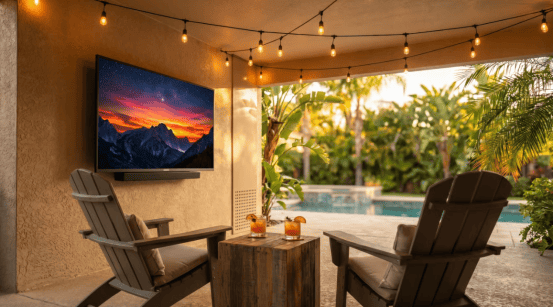
A purpose-built outdoor smart TV starts at 1,000 nits and premium models push past 4,000 nits — the same territory as commercial digital signage. Beyond brightness, these displays use anti-glare and anti-reflective coatings, UV-hardened panels that won't yellow or degrade over years of sun exposure, and sealed enclosures to keep insects, dust, and moisture out of the electronics.
There's also the matter of operating temperature. Most consumer TVs are rated for 50°F–104°F (10°C–40°C). A quality outdoor smart TV typically handles -22°F to 122°F (-30°C to 50°C), which means it can stay mounted through a Pacific Northwest winter or a Phoenix summer without damage.
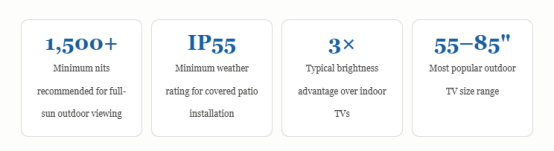
Note: Do not make a judgment based solely on the "peak brightness" value. Please be sure to inquire about the "Continuous Full-Screen Brightness" (APL100) rating – this value more accurately reflects the actual performance of the display when presenting uniformly bright images across the entire screen, such as daytime sports broadcasts. It is worth noting that some outdoor smart TVs on the market can only achieve their claimed high peak brightness in a small local area of the screen.
Anti-glare coatings work alongside raw brightness. Look for displays that specify "anti-reflective" (AR) rather than just "anti-glare" (AG). AR coatings reduce specular reflections — the harsh mirror-like hotspots — more effectively than AG coatings, which scatter light but can make the image look hazy in shade.
IP65 — Fully dust-tight with protection against water jets. Suitable for open patios where rain can reach the screen.
IP66 / IP67 — Higher-pressure water resistance and (in the case of IP67) short-term submersion. Required for poolside or coastal installations.
Some premium outdoor smart TV brands go beyond IP ratings and quote MIL-STD-810 compliance, a U.S. military standard that tests for humidity cycling, salt fog, and thermal shock. For coastal homes where salty sea air accelerates corrosion, MIL-SPEC certified units are worth the premium.
"An IP rating tells you how the enclosure performs — it says nothing about the quality of the display behind it."
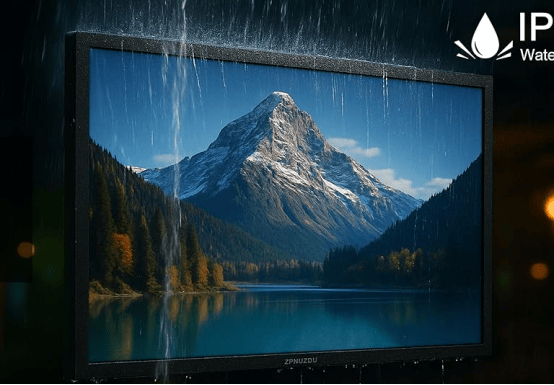
One more consideration: the outdoor smart TV's port covers and cable management. Even a highly rated display can be damaged if owners leave the HDMI or USB ports uncapped in wet conditions. Look for units with silicone gaskets on all input doors and, ideally, interior cable runs through the mount arm.
The general rule for an outdoor smart TV: multiply your intended viewing distance (in feet) by 8 to get the minimum diagonal screen size in inches. Sitting 12 feet from the screen? You want at least a 75-inch display. At 16 feet, consider 85 inches or larger.
Google TV / Android TV — The most app-complete ecosystem. Access to the full Google Play Store, Chromecast built-in, and Google Assistant voice control. Software updates are frequent, and the interface works well with voice commands — useful when your hands are full at a backyard cookout.
Roku TV — Known for its simplicity and excellent remote. Fewer customization options than Google TV, but fast, stable, and very easy to use. Strong for households that prioritize ease of use over configurability.
Proprietary platforms (e.g., Séura's SmartCast, SunBrite's integrated Roku) — Several outdoor smart TV manufacturers partner with established smart platforms rather than building their own. This is generally a positive sign — you get a mature, supported OS alongside specialized outdoor hardware.
Connectivity checklist
Before purchasing any outdoor smart TV, confirm: Wi-Fi 5 or Wi-Fi 6 support (streaming 4K reliably at outdoor distances from a router), a wired Ethernet port as a fallback, and Bluetooth 5.0 for wireless speakers. Many outdoor settings require a mesh Wi-Fi node nearby — account for this in your installation budget.
Mounting surface: Concrete, brick, or steel studs only. Never mount a heavy outdoor TV on wood siding without blocking. Large screens in windy areas should use VESA-rated mounts with a 150 mph wind load rating.
Cable management: Run all cables through conduit rated for outdoor use (Schedule 40 PVC or better). Do not use indoor extension cords. Power should run on a dedicated GFCI-protected outdoor circuit.
Viewing angle: Mount so the screen is perpendicular to the primary seating area. Tilt no more than 15° down. Avoid east-facing morning installations where direct sunrise creates a severe backlight problem.
Audio: Built-in outdoor TV speakers are almost always inadequate in open-air environments. Budget for a pair of dedicated outdoor speakers or a weatherproof soundbar mounted below the display.
Security: Consider a locking mount, especially for front-yard or less-visible patio installations. Several outdoor smart TV brands offer lockable enclosure kits or anti-theft cable anchors.
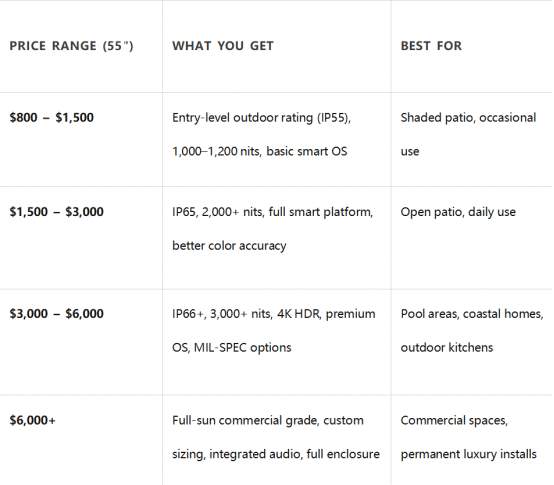
For most homeowners, the $1,500–$3,000 range hits the sweet spot — enough performance to handle a typical patio environment, a mature smart platform, and build quality that should last 7–10 years with basic maintenance.
A purpose-built outdoor smart TV starts at 1,000 nits and premium models push past 4,000 nits — the same territory as commercial digital signage. Beyond brightness, these displays use anti-glare and anti-reflective coatings, UV-hardened panels that won't yellow or degrade over years of sun exposure, and sealed enclosures to keep insects, dust, and moisture out of the electronics.
There's also the matter of operating temperature. Most consumer TVs are rated for 50°F–104°F (10°C–40°C). A quality outdoor smart TV typically handles -22°F to 122°F (-30°C to 50°C), which means it can stay mounted through a Pacific Northwest winter or a Phoenix summer without damage.
Brightness: The Single Most Important Spec
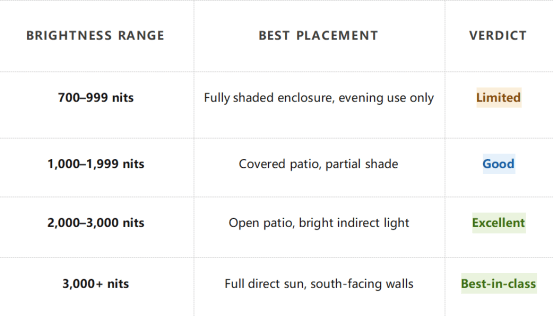
When shopping for an outdoor smart TV, brightness — measured in nits — is the specification that matters most. Here's a practical breakdown:
Note: Do not make a judgment based solely on the "peak brightness" value. Please be sure to inquire about the "Continuous Full-Screen Brightness" (APL100) rating – this value more accurately reflects the actual performance of the display when presenting uniformly bright images across the entire screen, such as daytime sports broadcasts. It is worth noting that some outdoor smart TVs on the market can only achieve their claimed high peak brightness in a small local area of the screen.
Anti-glare coatings work alongside raw brightness. Look for displays that specify "anti-reflective" (AR) rather than just "anti-glare" (AG). AR coatings reduce specular reflections — the harsh mirror-like hotspots — more effectively than AG coatings, which scatter light but can make the image look hazy in shade.
Weather Ratings Explained
Every serious outdoor smart TV carries an IP (Ingress Protection) rating from the IEC 60529 standard. The rating consists of two digits — the first rates solid particle protection (dust, insects), the second rates liquid protection (water).IP Ratings at a glance
IP55 — Protected against dust ingress and low-pressure water jets from any direction. Minimum for a covered patio or pergola.IP65 — Fully dust-tight with protection against water jets. Suitable for open patios where rain can reach the screen.
IP66 / IP67 — Higher-pressure water resistance and (in the case of IP67) short-term submersion. Required for poolside or coastal installations.
Some premium outdoor smart TV brands go beyond IP ratings and quote MIL-STD-810 compliance, a U.S. military standard that tests for humidity cycling, salt fog, and thermal shock. For coastal homes where salty sea air accelerates corrosion, MIL-SPEC certified units are worth the premium.
"An IP rating tells you how the enclosure performs — it says nothing about the quality of the display behind it."
One more consideration: the outdoor smart TV's port covers and cable management. Even a highly rated display can be damaged if owners leave the HDMI or USB ports uncapped in wet conditions. Look for units with silicone gaskets on all input doors and, ideally, interior cable runs through the mount arm.
Choosing the Right Size
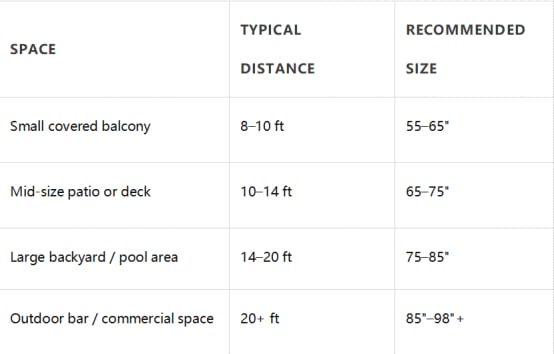
The size math for outdoor viewing is different from a living room setup. Viewing distances outdoors are almost always greater — guests spread across a deck, or viewers lounging on different sides of a pool — and ambient light reduces perceived contrast, which makes detail harder to resolve at distance.The general rule for an outdoor smart TV: multiply your intended viewing distance (in feet) by 8 to get the minimum diagonal screen size in inches. Sitting 12 feet from the screen? You want at least a 75-inch display. At 16 feet, consider 85 inches or larger.
Size recommendations by setting
Smart Platform: What to Look For
The "smart" side of an outdoor smart TV is increasingly important. A strong built-in operating system means fewer boxes, fewer remotes, and a cleaner installation. The main platforms you'll encounter:Google TV / Android TV — The most app-complete ecosystem. Access to the full Google Play Store, Chromecast built-in, and Google Assistant voice control. Software updates are frequent, and the interface works well with voice commands — useful when your hands are full at a backyard cookout.
Roku TV — Known for its simplicity and excellent remote. Fewer customization options than Google TV, but fast, stable, and very easy to use. Strong for households that prioritize ease of use over configurability.
Proprietary platforms (e.g., Séura's SmartCast, SunBrite's integrated Roku) — Several outdoor smart TV manufacturers partner with established smart platforms rather than building their own. This is generally a positive sign — you get a mature, supported OS alongside specialized outdoor hardware.
Connectivity checklist
Before purchasing any outdoor smart TV, confirm: Wi-Fi 5 or Wi-Fi 6 support (streaming 4K reliably at outdoor distances from a router), a wired Ethernet port as a fallback, and Bluetooth 5.0 for wireless speakers. Many outdoor settings require a mesh Wi-Fi node nearby — account for this in your installation budget.
Best Outdoor TV Use Cases by Setting
The right outdoor smart TV depends heavily on where and how it will be used. Here are the most common scenarios and what to prioritize for each:Covered patio or screened porch
The most forgiving environment. With a roof overhead and at least partial walls, an outdoor smart TV rated IP55 with 1,000–1,500 nits will perform well for most daylight hours. Focus budget on picture quality and smart features rather than maximum weatherproofing.Open deck or yard
Direct sun exposure demands 2,000+ nits and an IP65 or higher rating. Anti-glare coating quality becomes critical here. Consider a motorized mount or tilt bracket so you can angle the screen away from the sun's position at peak viewing times (typically early evening on west-facing walls).Poolside
Splashing, humidity, and chemical-laden air are the enemies. Prioritize IP66 or IP67 rating, stainless steel or marine-grade aluminum hardware, and a brand that explicitly certifies its outdoor smart TV for pool environments. Seal all cable entry points and plan annual inspection of gaskets.Outdoor kitchen or bar
Grease, smoke, and steam add a new challenge. Some outdoor smart TV manufacturers offer "full sun" models specifically designed for kitchen zones. Ensure the ventilation design exhausts away from cooking areas, and look for displays with cleanable screen coatings.Installation Tips
Even the best outdoor smart TV can be compromised by a poor installation. These are the most important factors to get right:Mounting surface: Concrete, brick, or steel studs only. Never mount a heavy outdoor TV on wood siding without blocking. Large screens in windy areas should use VESA-rated mounts with a 150 mph wind load rating.
Cable management: Run all cables through conduit rated for outdoor use (Schedule 40 PVC or better). Do not use indoor extension cords. Power should run on a dedicated GFCI-protected outdoor circuit.
Viewing angle: Mount so the screen is perpendicular to the primary seating area. Tilt no more than 15° down. Avoid east-facing morning installations where direct sunrise creates a severe backlight problem.
Audio: Built-in outdoor TV speakers are almost always inadequate in open-air environments. Budget for a pair of dedicated outdoor speakers or a weatherproof soundbar mounted below the display.
Security: Consider a locking mount, especially for front-yard or less-visible patio installations. Several outdoor smart TV brands offer lockable enclosure kits or anti-theft cable anchors.
Price Ranges: What to Expect
An outdoor smart TV costs more than its indoor equivalent — sometimes significantly more. Here's what each price tier realistically delivers:
For most homeowners, the $1,500–$3,000 range hits the sweet spot — enough performance to handle a typical patio environment, a mature smart platform, and build quality that should last 7–10 years with basic maintenance.
Final Checklist Before You Buy
Use this checklist as your final screen before committing to any outdoor smart TV purchase:- Minimum 1,500 nits for partial shade, 2,500+ nits for open sun
- IP65 r higher for exposed installations
- Operating temperature range covers your climate extremes
- Smart platform is actively supported (check update history)
- Wi-Fi 5 or 6 with optional wired Ethernet fallback
- VESA mount pattern matches your intended mounting hardware
- Warranty covers outdoor use (many standard warranties do not)
- Audio solution planned separately from built-in speakers


